Updated 12 min readWHMCS
A customer changes their email password, forgets the copy saved in a phone, and the phone keeps trying the old one. A few minutes later everything from that connection stops working: the website, webmail, FTP, cPanel. They open a ticket that says the server is down. It is not. Their IP address has been blocked by the server's own brute-force protection, and someone on your team is about to remove that block by hand for the third time this week.
Every cPanel host running CSF or cPHulk knows this ticket. This article is about why it happens, why the obvious shortcuts make the server weaker, and what a client self-service tool has to do to remove the ticket without removing the protection. At the end we introduce Firewall Unblocker, a free WHMCS addon we built that does exactly that.
Why a legitimate customer gets blocked
Two separate systems can block a visitor's IP on a typical cPanel server, and they behave differently.
cPHulk is cPanel's own brute-force protection. According to cPanel's documentation it watches logins to cPanel, WHM, mail (Dovecot and Exim), Pure-FTPd and SSH. When an IP address fails too many logins inside the protection period, cPHulk blocks that address. The default is 5 failures per IP, and a larger count (30 by default) escalates to a one-day block. Two details make this confusing for customers. cPHulk does not identify itself as the source of the block; the login page simply says "The login is invalid". And cPHulk can optionally write an iptables rule for the address, at which point the block is no longer limited to logins.
CSF, ConfigServer Security & Firewall, is the other one. Its login failure daemon, lfd, reads authentication logs continuously, counts failures across SSH, POP3, IMAP, FTP and HTTP password protection, and once the threshold is reached it uses csf to block the address for both inbound and outbound traffic. lfd reacts within seconds, which is the point. The same speed means a misconfigured mail client can take a customer's whole office offline before anyone has noticed the password prompt.
Both systems block the address, not the account. That is why the customer's site loads fine on their phone over mobile data and fails from the office, and why "the server is down" is the conclusion they reach.
The fixes that create new problems
The block is doing its job. The trouble is what hosts do to stop the tickets.
Whitelisting the customer's IP. In CSF, an address in csf.allow is always let through and an address in csf.ignore is never blocked by lfd. cPHulk's whitelist always allows logins. All of these are permanent trust. A home or office IP changes, and the whitelist entry then belongs to whoever holds the address next. Whitelists are for your own management addresses, which is exactly what cPanel recommends them for.
Raising the thresholds or turning off IP-based protection. This makes the false positives rarer by making every real attack cheaper. It is a server-wide trade for a per-customer problem.
A form where the client types an IP address. Now an authenticated client can remove a block on any address, including one your team put there on purpose, and can do it for addresses that were never theirs. The block on a compromised script kiddie's VPS is one text field away.
Handing out WHM or the CSF plugin. That is the whole firewall, not one block.
Keeping it a support ticket. This is the safe option and the expensive one. It scales with customer count, it lands at the worst times, and every engineer who has done it a hundred times starts removing blocks without reading the comment on them.
What a safe self-service design has to do
A self-service tool is safe only if it can never do more than the support engineer would have done after reading the block carefully. That gives a concrete checklist.
1. Act only on the address the client is connecting from. No input field at all. The tool reads the request's remote address and that is the only address it will ever check or unblock. This is also the only thing the client actually needs, since the blocked address is by definition the one they are on.
Behind a reverse proxy this needs care. When WHMCS sits behind Cloudflare, the origin sees a Cloudflare address and the visitor's real address arrives in the CF-Connecting-IP header. Cloudflare's documentation is explicit that this header is only set on traffic from Cloudflare's edge to your origin, and its own guidance for web servers is to trust it only from Cloudflare's published address ranges. A self-service tool has to apply the same rule: honor a forwarded header only when the direct peer is a configured trusted proxy, and otherwise fall back to the real remote address. Anything else lets a client forge the address they want unblocked.
IPv6 adds one more reason to use the live session address rather than a saved one. Privacy addresses rotate, so the address a client was blocked on an hour ago may not be the one they are using now.
2. Check only servers the client is entitled to. The tool should look at servers attached to the client's own active services, and only where the host has enabled self-service for that server and that product. A client with one shared hosting account has no business querying the firewall on every server in WHMCS.
3. Remove only blocks that automation created. This is where most of the judgment lives.
In CSF, lfd writes a descriptive comment and a timestamp on every block it creates. A block an administrator added by hand from the shell or from WHM usually carries a human comment, or none. CSF also reserves the phrase "do not delete" in a comment as an explicit instruction that the entry must survive rotation. And CSF's allow and deny files can hold networks in CIDR form and advanced filters that restrict specific ports, protocols and directions. None of those are accidents. A CIDR block, a port-specific rule, a "do not delete" entry or a comment that does not identify lfd as the author is administrator policy, and a client must not be able to remove it.
In cPHulk, the distinction is cleaner. The blacklist is administrator policy. A brute-force record is automation. The whitelist means the address was never blocked at all.
4. Fail closed on anything ambiguous. If the firewall's answer cannot be parsed, or the address matches a rule shape the tool does not understand, the right output is "contact support", never "your IP is clear". A false "clear" sends the client away with the problem unsolved and no reason to come back.
5. Re-check immediately before removing, verify afterwards, and admit unknowns. Firewall state changes between the moment a client sees a result and the moment they click. The tool should re-read the block right before removing it and apply the same policy to what it finds then. After the removal it should query again and report what it actually sees. If the panel accepted the request but the follow-up check failed, the honest result is "unknown", not "success".
6. Rate limit and record everything. Every attempt, allowed or refused, should be logged with the client, the address, the server, the protection, the action and the result. Rate limits stop a script from using the feature as a probe.
7. Talk to the control panel over verified HTTPS only. The tool is authenticating to WHM with privileged credentials. Without certificate verification, anything in the network path can pose as the server and collect those credentials.
8. Tell the client why. The block came from repeated failed logins to a specific service. Say so, in plain words, and warn that it will come back if the saved password is still wrong. Otherwise you have automated the ticket rather than the fix.
Firewall Unblocker
Firewall Unblocker is our implementation of that checklist as a WHMCS addon. We run our hosting business on WHMCS and cPanel, and this is the first of the WHMCS modules we are releasing. It is free of charge, and it can be ordered now from our store. The Firewall Unblocker page collects the screens, requirements and common questions in one place.
From the client's side it is one page under the Support menu, labeled "Unblock IP" by default. The page shows the address the client is connecting from and a single "Check Firewall Status" button. There is no field to type an address into. The check runs against every server linked to the client's eligible active services and returns one row per server and protection, marked "Not blocked", "Blocked" or "Unavailable", with the reason in plain language: repeated failed IMAP logins, repeated failed FTP logins, and so on. A block the policy allows the client to remove gets an "Unblock IP" button and a confirmation dialog that repeats the address, server, protection and reason, together with a warning that the block will return if the underlying problem is still present. A block the policy protects gets "Support required" instead.
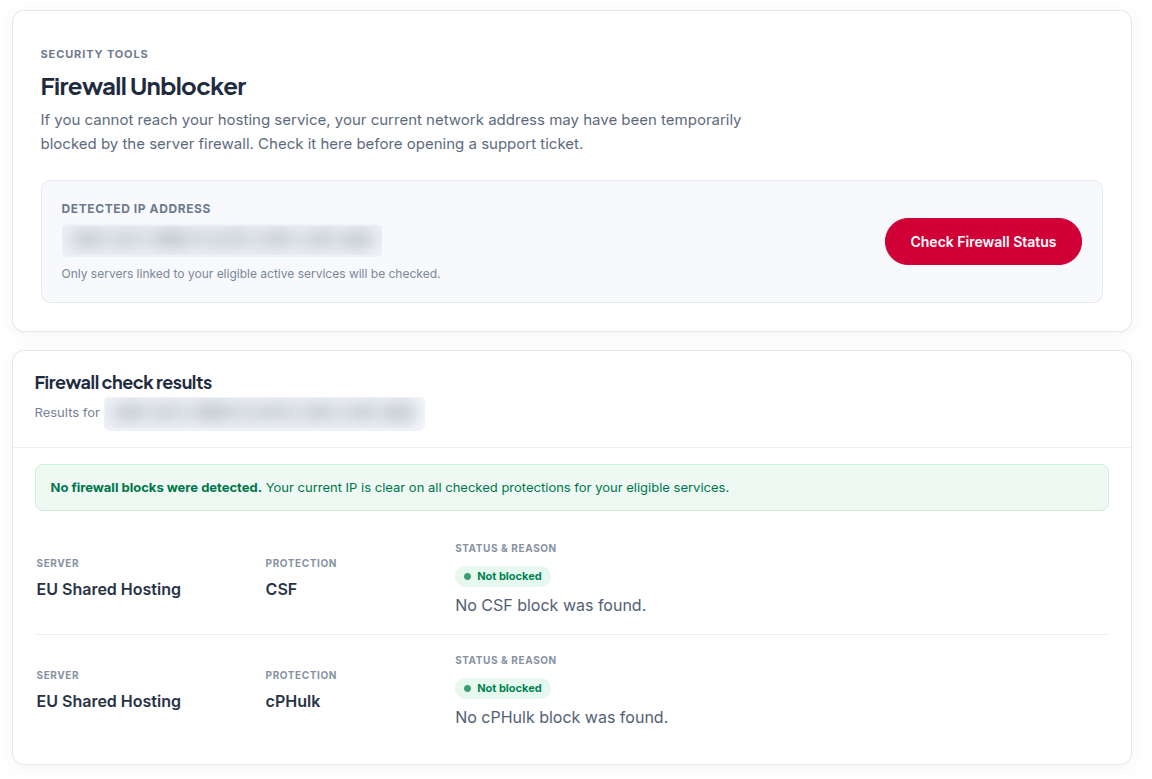
The client page after a check. There is no address field: the module shows the address the client is connecting from and checks only that. Here the address is clear on both protections. A blocked row would carry the reason and either an Unblock IP button or "Support required". The address is masked.
The policy is the one described above. Temporary lfd blocks on the exact address, covering all ports, whose comment identifies lfd as the author, are client-removable. Permanent csf.deny entries are client-removable only when their comment identifies lfd. Network and CIDR entries, port-specific and advanced rules, "do not delete" entries, and blocks whose comment reads as a human decision are held for support. In cPHulk, brute-force and excessive brute-force records are removable and the administrator blacklist is not. Administrators can add their own protected addresses, networks and comment patterns, and ambiguity always fails closed.
The remaining items on the checklist are built in: forwarded headers are honored only from configured trusted-proxy ranges, with CF-Connecting-IP and X-Forwarded-For modes and a fallback to the real remote address; the module re-reads firewall state immediately before any removal and again afterwards, and reports "unknown" when it cannot verify the result; client requests are rate limited; every action is written to an audit log that never contains credentials or license material; and the control panel connection is verified HTTPS, with no option to turn that off.
Administrators get a global IP search across all configured servers, explicit unblock for supported entries after confirmation, per-server and per-product enablement, protection rules, read-only provider diagnostics and the audit log. The client page is white-label and inherits your WHMCS theme.
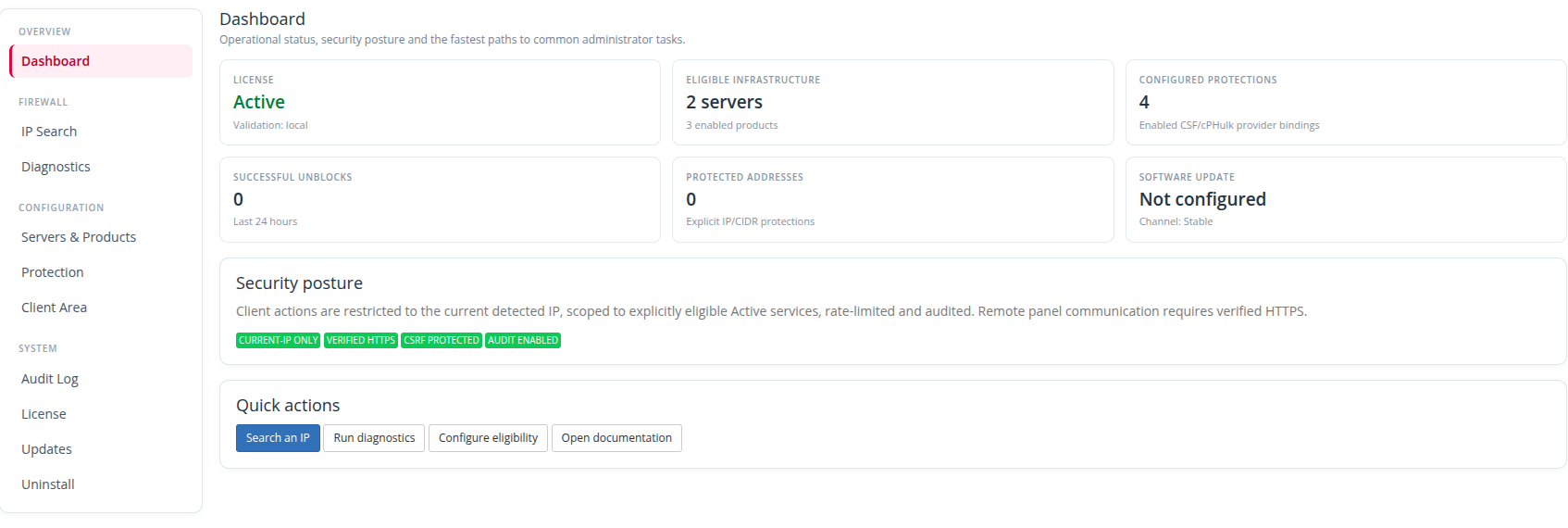
The administrator dashboard. The security posture line is a summary of the controls this article has been describing, not a setting: none of them can be switched off.
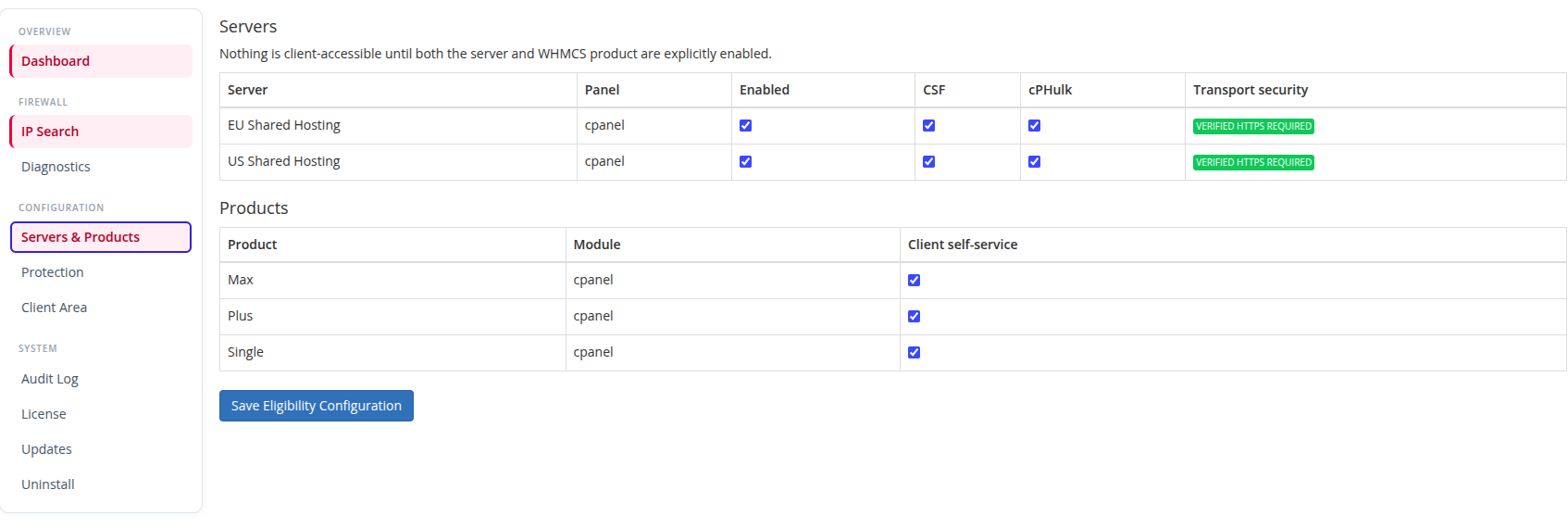
Eligibility is opt-in twice over. A server has to be enabled, with CSF and cPHulk switched on independently, and the WHMCS product has to be enabled too. A client sees nothing until both are true for one of their active services.
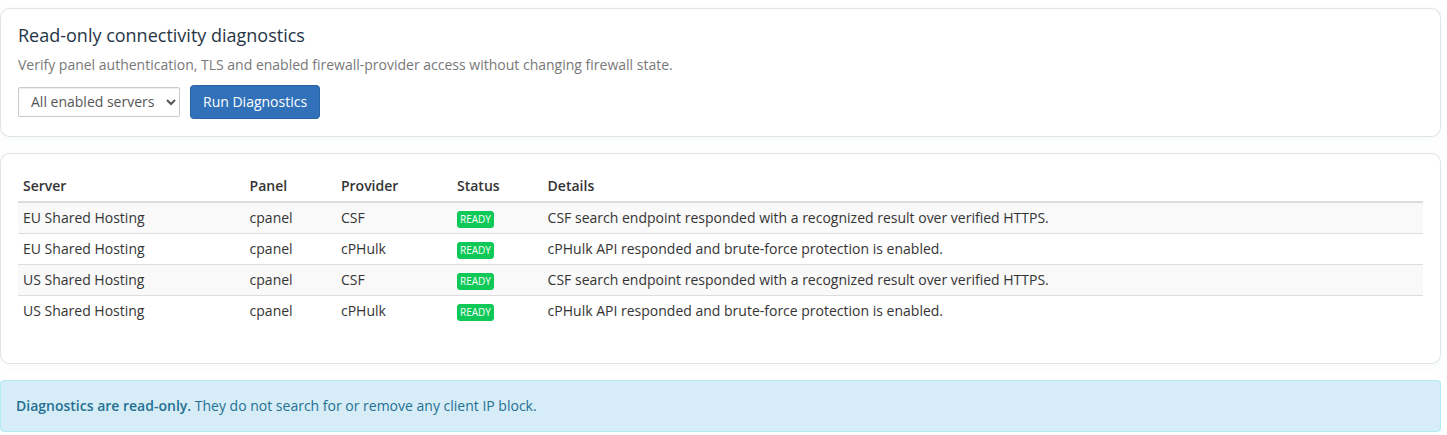
Diagnostics confirm panel authentication, the TLS chain and each provider's response before any client can use the page. They read; they never change firewall state.
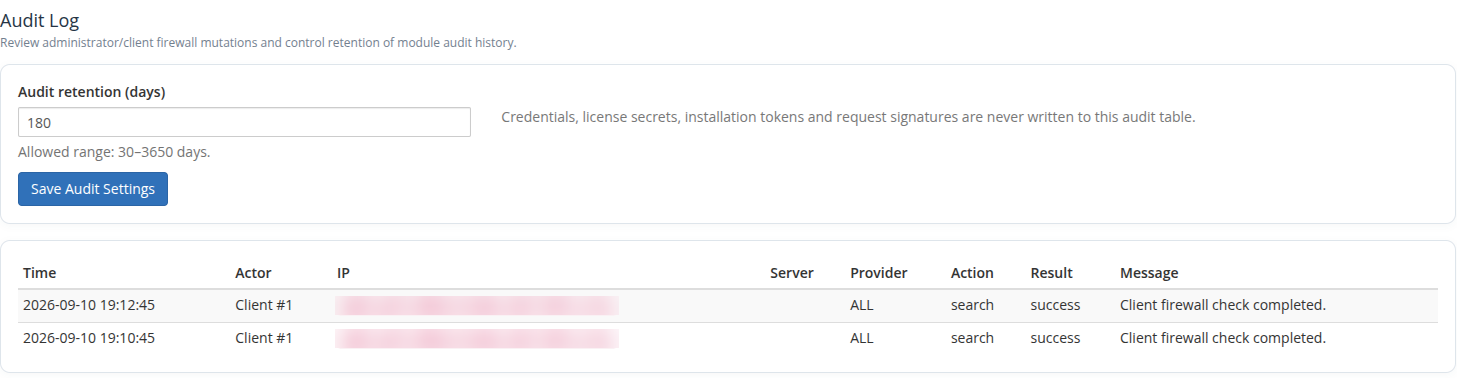
Every check and every removal is recorded, including the ones the policy refused. The IP addresses in these rows are masked.
Support matrix
| Component | Supported |
|---|---|
| WHMCS | 8.13.x and 9.0.x |
| PHP | 8.2 and 8.3 |
| ionCube Loader | 13.0 or later |
| Control panel | cPanel & WHM |
| Protections | CSF/LFD and cPHulk, enabled independently per server |
| Addressing | IPv4 and IPv6 |
WHMCS 9.0 requires PHP 8.2 or 8.3 in any case, and WHMCS 8.13 is the current long-term support release, so this matrix covers both supported WHMCS branches at the time of writing. Version 1.1.0 has since added WHMCS 9.1 and Plesk for Linux with Fail2Ban.
What to know before you install it
- This is the first release. Updates are currently installed by replacing the package. The signed automatic updater exists in the code and stays disabled until its own qualification is finished.
- cPanel first, then Plesk. The first release worked with cPanel & WHM only. Version 1.1.0, released on November 19, 2026, added Plesk for Linux through Plesk's own Fail2Ban, and support for WHMCS 9.1. The module page has the current requirements.
- A license is still required, even though there is no charge. It is bound to the WHMCS installation's domain, IP address and directory, with a signed local key and an offline grace period. Reissue it if you move WHMCS.
- Deactivating keeps your data. A full uninstall has to be explicitly armed before you press Deactivate in WHMCS.
- CSF itself has changed hands. ConfigServer announced on July 30, 2025, that it would close on August 31, 2025, and released CSF under the GPLv3. cPanel now maintains its own fork for cPanel & WHM systems, and community forks such as Black-HOST/csf and Sentinel Firewall continue it under the same license. Firewall Unblocker talks to the CSF plugin installed in WHM, so which of these your servers run does not change how the module works. It does mean the CSF documentation we relied on for this article is an archived copy of the original vendor's readme.
Full documentation, including installation, trusted-proxy configuration and the protection rules, is at docs.redwaterhost.com/firewall-unblocker.
Where this leaves the ticket
The customer with the wrong password on their phone still gets blocked. What changes is that they can see why, fix the password, and let themselves back in without waiting for a human to read a firewall comment at two in the morning. The blocks your team placed on purpose stay exactly where they are.
If you run WHMCS with cPanel or Plesk servers, order Firewall Unblocker and try it on one server with one product first. If something in the policy does not match how your firewall is set up, tell us. Ideas for the next release are on our feedback board, where you can vote on them or add your own.