Firewall Unblocker for WHMCS
Version 1.1.0 · now with Plesk support
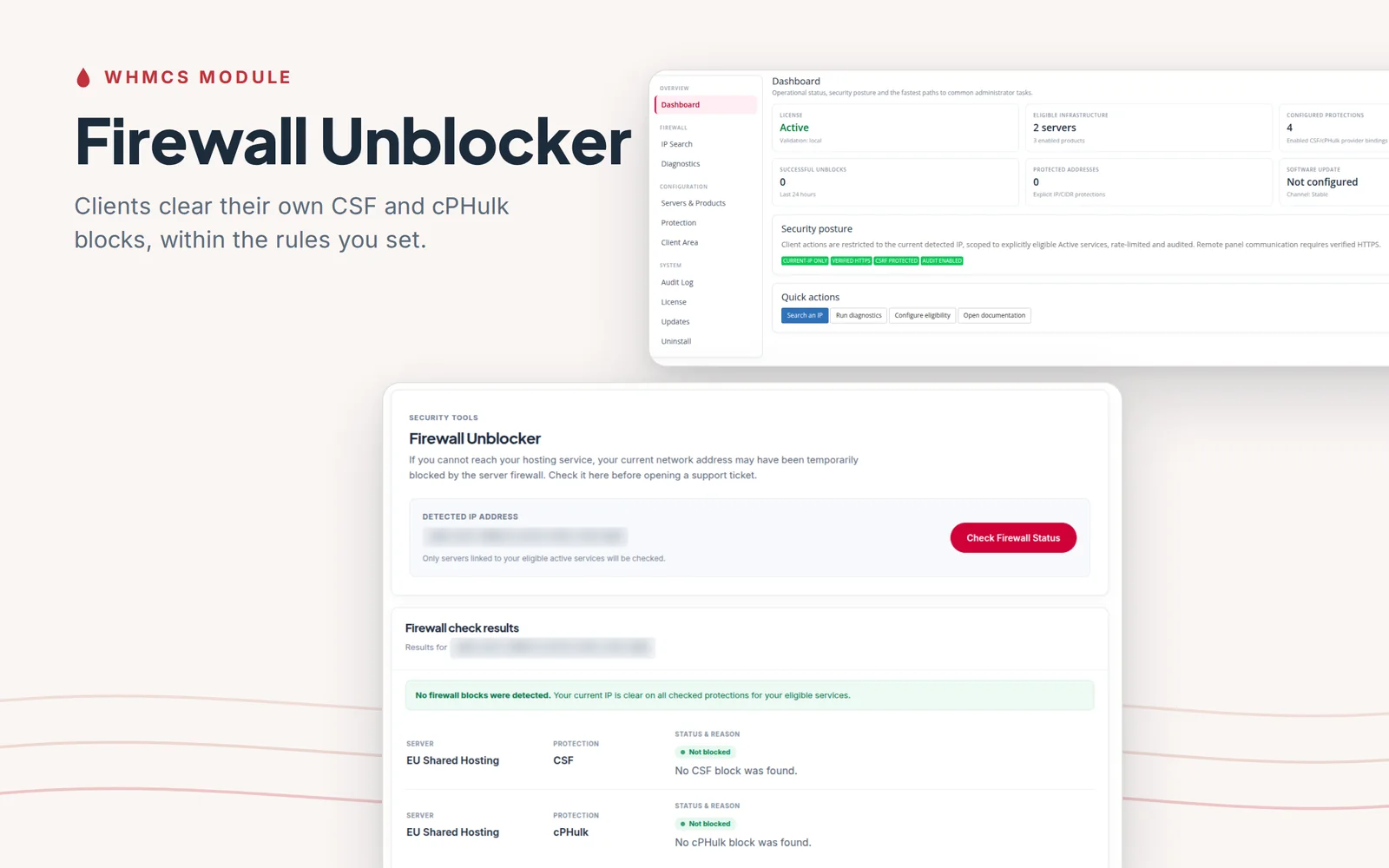
Your clients check and remove their own firewall blocks without opening a ticket. It works with CSF/LFD and cPHulk on cPanel & WHM, and with Fail2Ban on Plesk for Linux.
The problem it solves
A client changes their email password and a phone keeps trying the old one. A few minutes later lfd, cPHulk or Fail2Ban blocks their IP, and the website, webmail, FTP and the control panel all stop working from that connection. The ticket says the server is down. Someone on your team reads the block and removes it by hand, again.
The usual shortcuts each cost something. A whitelist is permanent trust for an address that changes owner, higher thresholds weaken the server for everyone, and a form where the client types an IP lets them clear blocks that were never theirs. Firewall Unblocker lets the client remove only the blocks a careful support engineer would have removed for them.
The longer version, with the research behind it, is in our article on self-service IP unblocking.
How it works
- 1
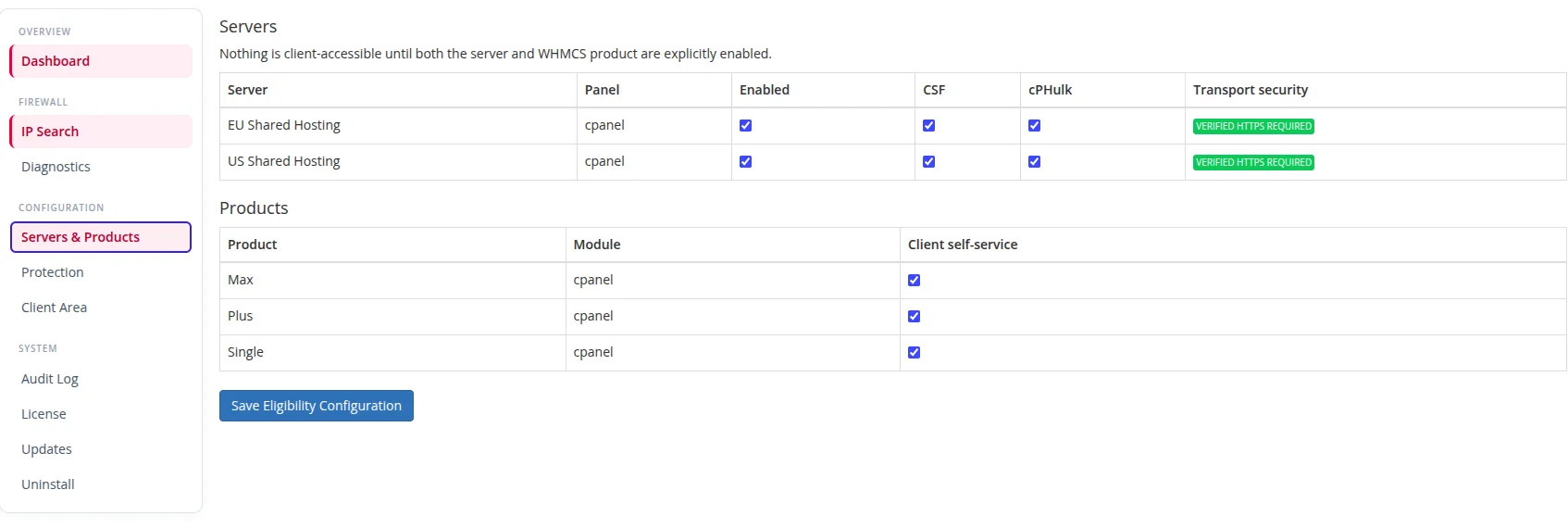
You choose the servers and products
Nothing is open to clients until you enable a server and the WHMCS products that may use it. A client sees the page only for servers behind their own active services. If an enabled server has no product selected, the page warns you, because no client would ever see that server.
- 2
You switch on each protection per server
On a cPanel & WHM server, CSF and cPHulk are enabled separately. On a Plesk for Linux server you enable Fail2Ban, which Plesk calls IP Address Banning. The module uses the server connection WHMCS already has, so there is no second set of credentials. Diagnostics then check the login, the certificate and each protection's answer, and say so when a server's own firewall may be blocking WHMCS. They only read; they never search for or remove a block.

- 3
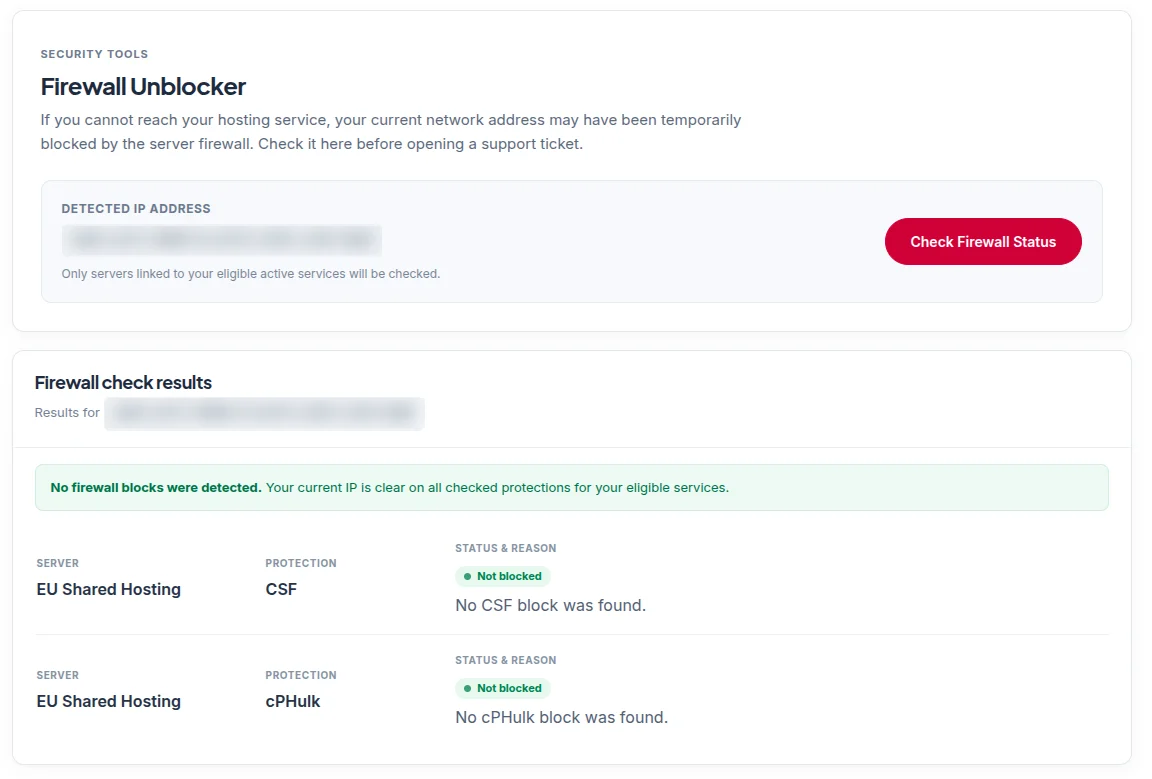
The client checks the address they are on
The page shows the client's current address and one button. There is no field to type another address into. Each result gives the reason in plain words, such as repeated failed IMAP logins.
- 4
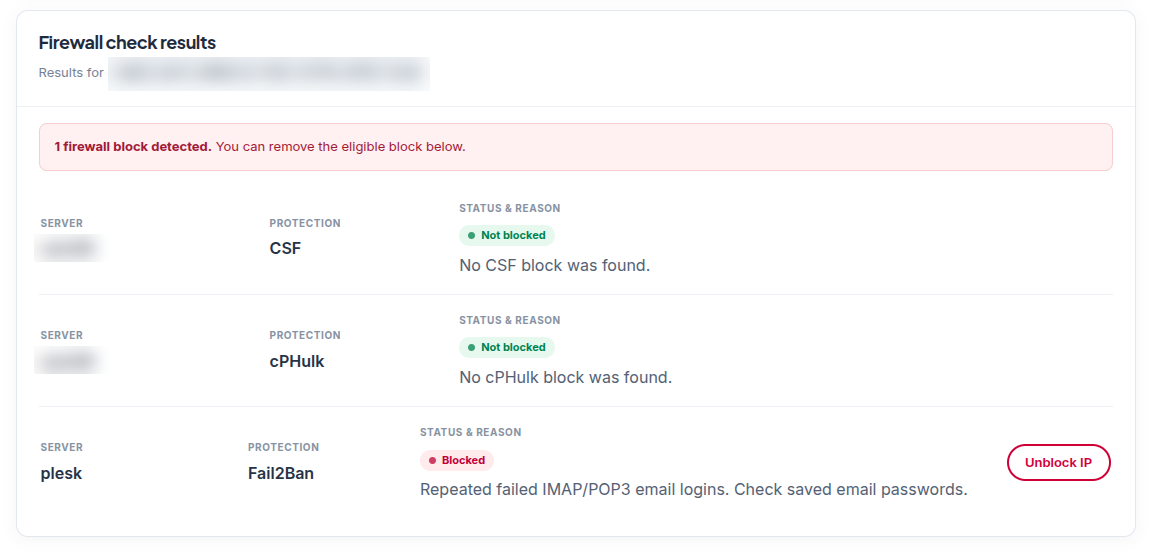
Blocks your policy allows get an Unblock button
On cPanel that means temporary lfd blocks and cPHulk brute-force records. On Plesk it means Fail2Ban bans on that one address, and a single Unblock clears every jail holding it on that server. The rest show Support required: ranges, port-specific rules, "do not delete" entries, manual blocks and the cPHulk blacklist on cPanel, and repeat-offender jails and range bans on Plesk.
- 5
Every action is on record
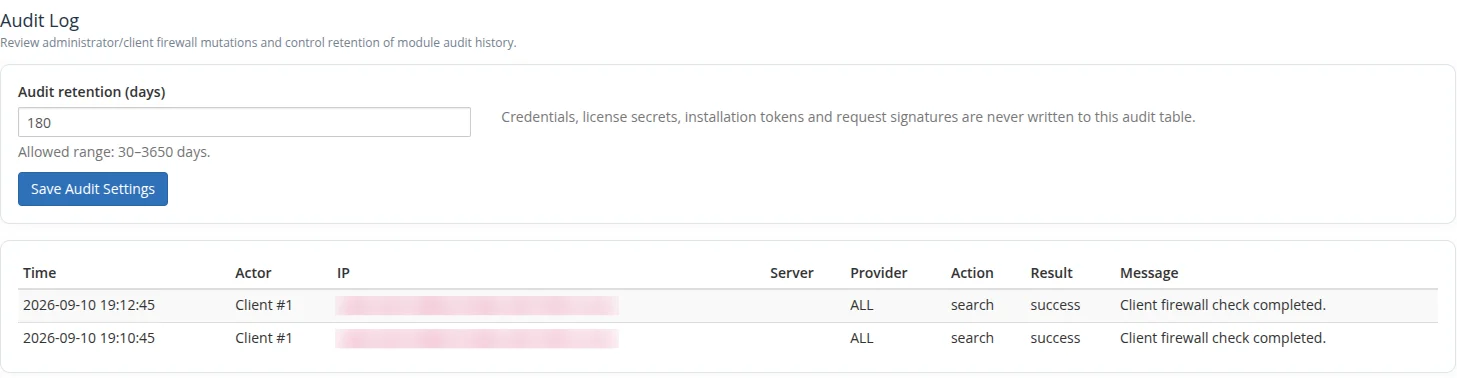
The module re-reads the block just before removing it and checks again afterwards. If it cannot confirm the result, it says so. Every check and removal goes into the audit log, including the ones the policy refused.
What you get
For your clients
- One page under Support, labeled Unblock IP by default and renamable
- The reason for each block in plain words, with a warning that it comes back if the saved password is still wrong
- IPv4 and IPv6, using the address of the current session
- Follows your WHMCS client-area theme
For your team
- Search for an IP across every enabled server, cPanel and Plesk together
- Unblock supported entries after a confirmation
- Your own protected addresses, networks and rule patterns, which match CSF comments and Fail2Ban jail names
- Read-only diagnostics and an audit log with configurable retention
Controls that stay on
- Anything the module cannot read with certainty means contact support, never clear
- Forwarded headers trusted only from proxy ranges you configure, including Cloudflare
- Verified HTTPS to WHM and to Plesk, with no option to turn it off
- Client requests rate limited
What is new in Firewall Unblocker 1.1.0
- Plesk for Linux: clients check and remove Fail2Ban bans on their own address, IPv4 or IPv6
- WHMCS 9.1, alongside 8.13 and 9.0
- Diagnostics tell you when a server's firewall may be blocking the WHMCS server itself
- A warning when an enabled server has no eligible product selected
- Fixed: "Bad accesshash or API token" (HTTP 403) on cPanel servers
- Fixed: admin menu highlighting, and the layout of the unblock dialog and the results table
Released . Updates are installed by hand, following the upgrade steps in the documentation.
Screens
From our test installs. Addresses and some server names are masked. On your WHMCS they show your own servers, products and theme.
Price and requirements
Free
A free license per WHMCS installation.
- WHMCS 8.13, 9.0 or 9.1, on PHP 8.2 or 8.3
- cPanel & WHM servers running CSF/LFD, cPHulk or both
- Or Plesk for Linux servers with Fail2Ban (IP Address Banning) switched on
- Verified HTTPS from WHMCS to each server, so every server needs a valid certificate for its host name
- ionCube Loader 13 or newer
What it does not do yet
- Clients cannot remove every block. Network ranges, port-specific rules and blocks your team added stay with support, and on Plesk so do the repeat-offender jails and range bans
- On Plesk it reads Plesk's own Fail2Ban and nothing else. Imunify360, CSF on Plesk, the static rules of the Plesk Firewall extension and Plesk for Windows are not supported
- Updates are installed by uploading the new package
If something behaves differently on your WHMCS version or theme, tell us. Ideas for what it should do next go on our feedback board, where other hosts can vote on them.
Questions hosts ask
Can a client unblock any IP address?
No. The module reads the address of the client's current session and works only on that one. There is no field to type an address into.
Which blocks can a client remove?
On cPanel: temporary lfd blocks on their exact address covering all ports, permanent csf.deny entries whose comment shows lfd created them, and cPHulk brute-force records. Network ranges, port-specific and advanced rules, "do not delete" entries, blocks with a human comment and the cPHulk blacklist stay, and the client is told to contact support. Plesk has its own answer below.
Does Firewall Unblocker support Plesk?
Yes, since version 1.1.0: Plesk for Linux, through the Fail2Ban that ships with Plesk (Tools & Settings, IP Address Banning). It uses the Plesk connection already stored in WHMCS. Imunify360, CSF on Plesk, the Plesk Firewall extension's static rules and Plesk for Windows are not supported.
Which Fail2Ban bans can clients remove?
Bans on their own address from the ordinary jails, such as the one for repeated failed email logins. If the address sits in several jails on one server, the client sees one result and one Unblock clears them all. Bans from the plesk-modsecurity jail are removable by default. Add a jail's name to Protected rule patterns and its bans go to support instead.
Can clients remove repeat-offender or range bans?
No. Bans from the recidive, plesk-one-week-ban and plesk-permanent-ban jails are never offered to clients. Your team can lift them from the admin search page. A ban on a whole address range is not removable through the module at all, because unbanning one address does not lift it. That one needs a look in Plesk.
Can clients unblock IPv4 and IPv6 addresses?
Yes, both, on cPanel and on Plesk. It is always the address of the client's current session, whichever kind that is.
Can I use Firewall Unblocker with WHMCS 9.1?
Yes. Version 1.1.0 supports WHMCS 8.13, 9.0 and 9.1, on PHP 8.2 or 8.3.
How do I update from 1.0.0 to 1.1.0?
By hand. There is no automatic update. Download 1.1.0 from your client area, back up the WHMCS database and the module folder, and replace modules/addons/firewallunblocker with the new files. Then open Firewall Unblocker in the admin area, check that the license shows Active and run Diagnostics.
Does upgrading keep my settings and audit history?
Yes. The upgrade replaces the module's files and adds one setting, the Fail2Ban switch for each server. It does not remove anything from the module's tables. We upgraded a 1.0.0 install to 1.1.0 before the release and its settings were intact.
Does it work behind Cloudflare or a load balancer?
Yes, if you configure the proxy's address ranges. The module reads CF-Connecting-IP or X-Forwarded-For only when the request comes from a trusted proxy, and otherwise uses the real remote address, so a client cannot forge the address they want unblocked.
Which CSF does it work with?
Any build with the WHM plugin installed. ConfigServer closed in 2025, and CSF continues as cPanel's own fork and community forks. The module talks to the plugin in WHM, so which one your servers run does not change how it works.
Is it really free?
Yes. It still needs a license, which costs nothing. The license is tied to your WHMCS domain, IP address and folder, and you can reissue it if you move WHMCS.
What does it send to Red Water?
Only the license check: the license key, your WHMCS domain, the server's IP address and the WHMCS folder. Nothing about your clients or servers.
What happens when I deactivate it?
Your settings and audit history stay. A full uninstall that removes the module's tables has to be switched on before you press Deactivate in WHMCS.
Help improve Firewall Unblocker
Running Firewall Unblocker on your servers? Suggest an improvement, or vote on what other hosts have asked for.
Our other WHMCS modules
AccountGuardAvailable · $49 a year
A second sign-in step for every client and admin account, without asking clients to enroll in anything.
VPS ManagerIn development
One set of records for the VPS servers you have and the services you have sold. In development, with nothing to buy yet.
Articles about Firewall Unblocker
- Customer Locked Out? How to Find and Clear a CSF or cPHulk Block
- Let Clients Unblock Their Own IP Without Handing Them the Firewall
More on running WHMCS is under WHMCS articles.