7 min readWHMCS
When we introduced VPS Manager the subject was architecture: a provider-neutral VPS management layer for WHMCS, rather than another module wired straight into one provider's API. The second update showed the first working screens.
VPS Manager has since moved into release preparation. The priority is no longer headline features. It is whether the product can be installed, configured, licensed, upgraded and operated by somebody who did not write it.
That turns out to be a different engineering problem, and a less glamorous one.
Testing on installations that have never seen it before
The most useful change has been moving testing onto fresh WHMCS installations instead of the development environment where VPS Manager grew up.
A development environment accumulates state. Database columns that were added by hand months ago, a provider account that was authorized before the authorization flow existed, a product that was configured correctly by somebody who already knew which fields mattered. None of that exists on a clean install, and every one of those assumptions is a bug waiting for the first administrator who is not us.
Fresh-install testing has already produced work on database compatibility, provider authorization, product configuration, onboarding, adoption of existing services, customer controls and provisioning diagnostics. The objective is narrow: a new administrator installing VPS Manager should not need to understand its internal architecture to work out what to configure next.
Most of that has landed in the Setup Center, which is becoming the primary onboarding and readiness interface. The more specialist screens remain where they were, for advanced configuration and day-to-day operations, but they are no longer the thing you meet first.
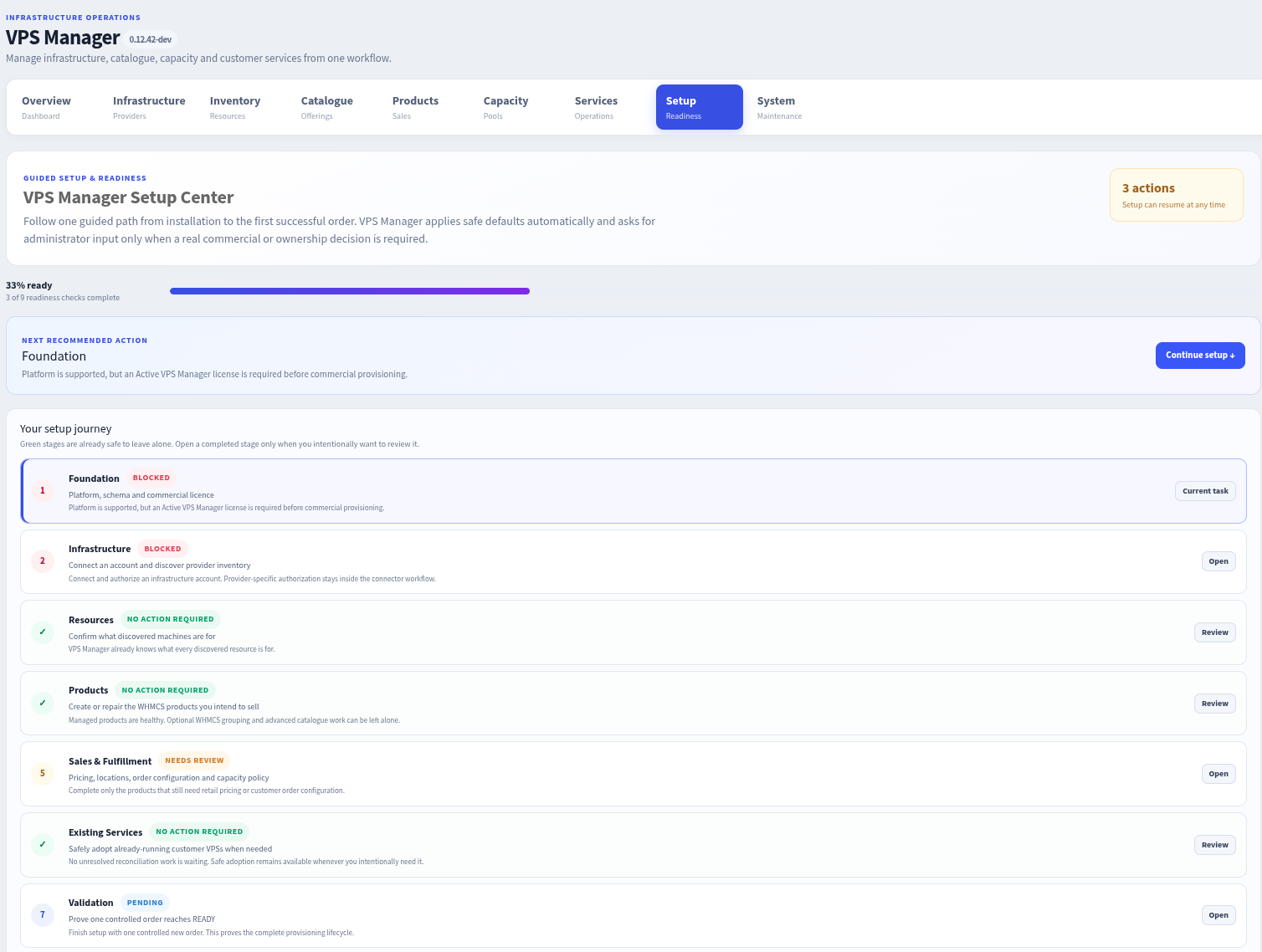
Setup Center part-way through, in a development build. Three actions outstanding, a named next step with the reason attached rather than a bare error, and stages that need nothing saying so. That last part matters as much as the warnings: an onboarding screen that flags everything teaches an administrator to ignore it. The stage at the bottom is the one we care about most, because setup is not finished until one controlled order has been driven all the way to READY.
Existing infrastructure, without pointless reinstallations
The other area taking real time is existing infrastructure.
VPS Manager is not only for new orders. A hosting company adopting it usually already has VPS resources running and WHMCS services billing for them, and those machines contain customer data. Treating them as new provisioning requests can destroy that data.
So an existing VPS can be associated with the correct existing WHMCS service through the adoption and reconciliation workflow, without any provisioning action being taken against the machine.
The lifecycle boundaries around that are deliberately strict:
- a Pending WHMCS service stays in the new-service provisioning workflow, because Pending is what an unfulfilled order looks like;
- adoption applies to services that are already Active or Suspended, which is what an existing, running service looks like;
- an already-assigned server is not silently moved between unrelated WHMCS services.
The last rule is the one that sounds like an edge case and is not. Silent reassignment is how a management layer ends up pointing a customer's control panel at somebody else's server.
Provisioning, and the welcome email problem
Provisioning is treated as a durable workflow rather than a single API call. The current process covers allocation, operating-system installation, hostname configuration, credentials and final readiness checks before the WHMCS service is considered complete.
Which raises a problem WHMCS hands to every provisioning module.
WHMCS's own developer documentation is explicit about what happens when a module's create function returns success: the service status changes to Active and the product welcome email is sent. That model fits a control-panel account, where creation is one call that either worked or did not. It fits a VPS considerably less well. A server that has been allocated but not yet installed, named, credentialed and checked is not something a customer should be receiving login details for.
So where WHMCS is configured to send the product welcome email, VPS Manager now holds it until provisioning has reached the appropriate state and the final credentials actually exist. The customer gets one message, when there is something at the other end of it.
Customer-facing management stays inside WHMCS, with VPS Manager supplying the infrastructure controls appropriate to the selected provider and the configured policy.
Provider diagnostics, and finding your own IP address
The first connector is still netcup.
Testing against real provider infrastructure has produced better diagnostics for the ways provider APIs fail: authentication rejections, source-IP restrictions, timeouts and errors returned by the provider itself. An administrator who gets "authentication failed" needs to know which of those it actually was.
One of those cases deserves its own tool. Where provider API credentials are restricted by source IP, the address that matters is the public outbound IP of the WHMCS server, and that is not always the address the administrator thinks it is. A WHMCS installation sitting behind Cloudflare, NAT or a reverse proxy can present one address to visitors and leave through another entirely. VPS Manager can now report the outbound address it is actually using, which turns a confusing authorization failure into a five-minute fix.
netcup is the first connector, not the shape of the product. These behaviors are implemented in the provider-neutral core and at the connector boundary, rather than as netcup-specific assumptions scattered through the codebase. That distinction only stays true if it is enforced while the second connector does not exist yet, which is the point at which it is easiest to get wrong.
Release engineering has started
The other significant change is that we are building the distribution process now.
VPS Manager will be distributed as protected PHP software using ionCube, which compiles PHP source into an encoded format that requires the ionCube Loader extension on the server running it. That is a real installation requirement for anybody deploying it, and it is one of the things fresh-install qualification exists to check. Software licensing is handled through Red Water Hosting.
That path has already been used once. Firewall Unblocker, a much smaller addon, shipped on September 12 through the same store, the same ionCube protection and the same licensing model: a key bound to the WHMCS installation, with an offline grace period. Proving the delivery process on a free module, where a mistake costs somebody an afternoon rather than money, is a cheaper place to find out what it gets wrong.
We are currently building the reproducible release process: take an exact reviewed source revision, produce the protected package from it, and qualify that same package on clean WHMCS installations, so the package that ships is the one that was tested, not a rebuild that resembles it.
The commercial WHMCS product, the licensing, the renewal lifecycle and the customer delivery process are being configured now rather than after development finishes. That is deliberate. We want the release candidate to test whether the whole product lifecycle works, not only whether the code does: installation, licensing, updates, customer access, migrations and eventually renewals. Plenty of software is qualified as code and then shipped through a delivery process nobody tested.
What happens next
The first release candidate will be tested internally across multiple WHMCS environments before we consider wider availability. The immediate priorities are:
- finish the remaining fresh-install qualification;
- finalize the protected release build process;
- validate the licensing and distribution lifecycle end to end;
- freeze an exact release source revision;
- install and test the encoded package the way a customer would;
- keep tightening documentation and onboarding.
The first release stays focused on the netcup connector. Additional providers follow once the core workflow and the first connector have had enough real-world qualification to be worth generalizing from. We would rather reach a first release with a small, well-tested provider scope than a longer connector list sitting on a foundation that is still moving.
There is still no release date, no pricing and nothing to buy, and VPS Manager has not reached a release candidate. The disclaimer from the earlier posts stands in full: the connector is ours, and netcup is not involved in this project and does not endorse, support or supply it.
The scope has not changed since the first post: manage VPS products through WHMCS without tying a hosting company to one infrastructure provider. Getting a first version out is the whole priority at the moment. Improvements and connectors for other providers come after it rather than before it, which is the only way the first connector gets the qualification the second one will be built on.
We will publish another update once the first release candidate has completed internal qualification. If your company runs WHMCS alongside VPS infrastructure, we would rather hear from you now than after the interfaces harden. If the provider you use is not netcup, or something above sounds wrong for the way your setup works, tell us.