11 min readWHMCS
A client of yours reuses a password. Not the one for your client area specifically, just the one they use everywhere, and one of those everywheres leaks. Nobody has to break anything after that. Someone tries the email address and password on your WHMCS login, it works, and they are in. No alert fires on your side, because from WHMCS's point of view the right person typed the right password.
What follows covers what that sign-in gives an attacker in a hosting client area, what WHMCS has built in to stop it, and how the common second factors hold up against the ways they are actually attacked. The last section covers AccountGuard, the WHMCS addon we built for this problem, which is now in public beta.
What a client login opens
For a hosting customer, a WHMCS client area is the control point for almost everything they run online, and WHMCS's own documentation describes most of what follows as standard client features.
Domains. From Domains, My Domains, a client can turn off the registrar lock and retrieve the EPP code. Those two actions are all a domain transfer needs. Depending on the registrar module, the same page changes nameservers, edits DNS records and sets up email forwarding. Whoever controls DNS controls where the website points and where the email goes, and with the email they control password resets for everything else the client owns.
Services. Hosting accounts, VPS servers and their control panels are usually one click away through single sign-on. Reinstall buttons, password resets and module actions sit on the same pages.
Billing. Invoices, payment methods and order history, plus the ability to place new orders on a card the account already has.
Support. A ticket opened from the client area arrives as the client. Your team has no reason to doubt it, because the system says the account holder is asking.
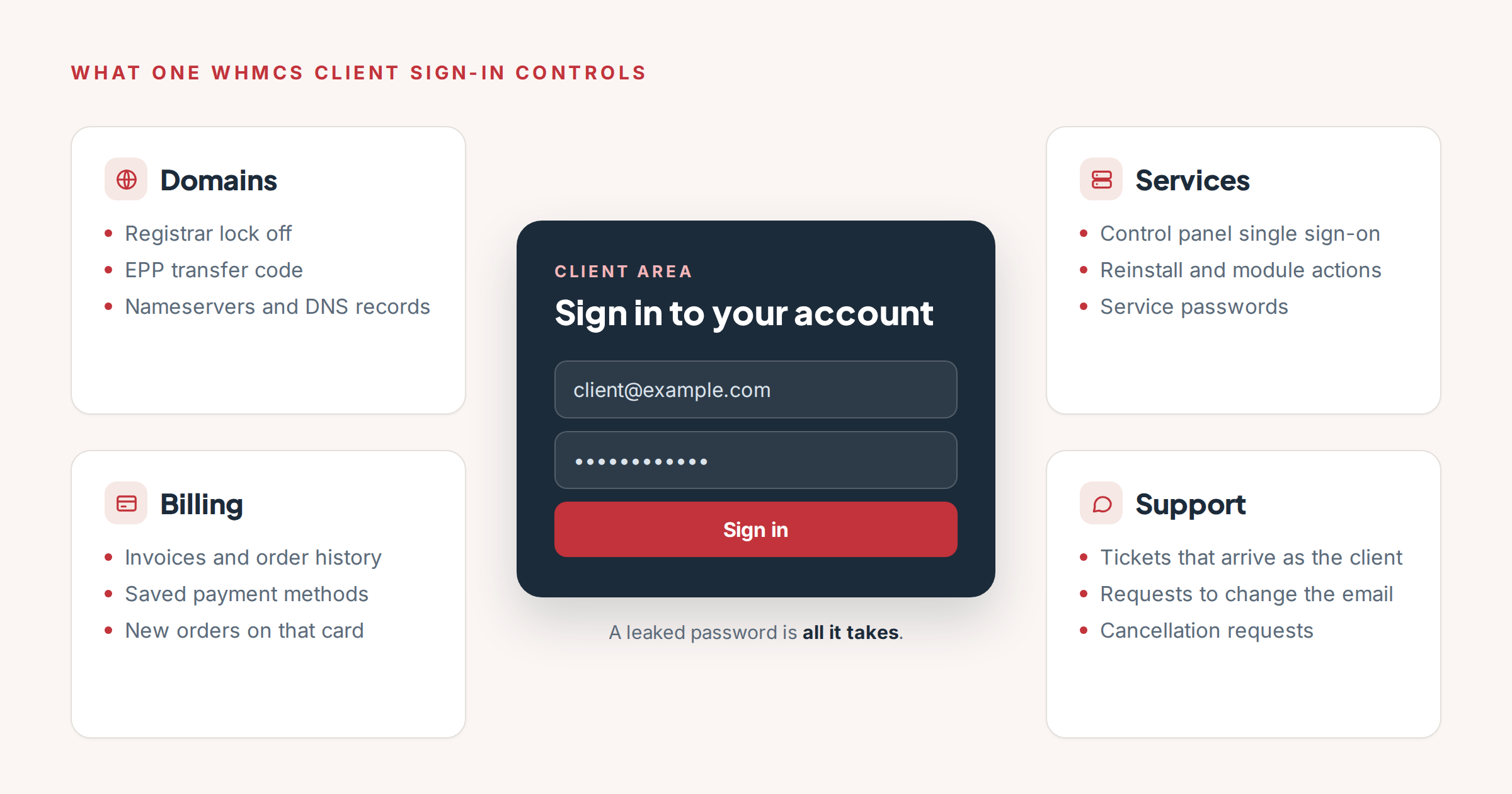
One password stands in front of all of this. The exact list depends on your registrar and server modules, but domains, services, billing and support are in every WHMCS client area.
None of this needs a flaw in WHMCS. A stolen password is enough, which is why a taken-over client account is a quiet incident: the logs show a normal sign-in, and the first sign of trouble is often a domain that has moved or a ticket the client says they never wrote.
How often credentials are the way in
The headline numbers changed this year. In Verizon's 2025 Data Breach Investigations Report, the use of stolen credentials was the most common way attackers got in, at 22% of breaches. In the 2026 report it fell to 13%, overtaken by exploited vulnerabilities at 31%. The same report then adds the figure that matters more for this article: counting credential abuse at any stage of a breach, not only the first step, it "still sits on top at 39%."
Credential stuffing, where lists of leaked email and password pairs are tried against other sites, is constant background traffic. In additional research published with the 2025 report, Verizon found that on a median day, 19% of all authentication attempts in the single sign-on logs it studied were credential stuffing.
We have not found published research on stuffing aimed at WHMCS in particular, and we are not going to pretend otherwise. The point is simpler. Any login form on the internet that accepts an email address and a password receives this traffic, and a WHMCS client area is a login form that guards domains and servers.
The defense is just as well documented. A 2023 study by Microsoft researchers of accounts that showed signs of attack found that multifactor authentication reduced the risk of compromise by 99.22% overall, and by 98.56% for accounts whose credentials had already leaked.
What WHMCS gives you today
WHMCS has built-in two-factor authentication with three services: time-based codes from an authenticator app (enabled by default), Duo push notifications, and YubiKey one-time passwords. Clients set it up under Security Settings in the client area.
Two things limit how much protection that gives a typical client base.
First, it is opt-in for each person. You can require two-factor authentication globally, in which case every user and admin has to set it up at their next login. That is the only switch. There is no way to give protection to the clients who will never install an authenticator app, and there is no middle ground between "optional" and "everyone must enroll an app before they can get to their invoice". Most hosts leave it optional for clients, which in practice means most clients do not have it.
Second, there are no passkeys. As of the WHMCS 9.1 beta release notes published on September 30, 2026, WHMCS ships no passkey or WebAuthn option, no email codes, and no alert when someone signs in from a new browser. WHMCS 9.0 did add rate limiting on client logins, which slows down guessing. It does nothing about a password that is simply correct.
How the second factors differ
Any second factor stops the attack in the opening paragraph, where someone has a leaked password and nothing else. The differences show up against the next attack: a phishing page that looks like your client area and passes everything the client types to the real one, in real time.
Microsoft's analysis of the Tycoon2FA phishing kit describes how it could "bypass nearly all commonly deployed MFA methods, including SMS codes, one-time passcodes, and push notifications" by relaying the code to the real service while the victim waits.
NIST's current authentication guidelines, SP 800-63B-4, published in July 2025, state the reason in one sentence: authenticators that involve typing in a code "SHALL NOT be considered phishing-resistant because the manual entry does not bind the authenticator output to the specific session being authenticated." A code proves the person has the phone or the mailbox. It does not prove they are typing it into your site.
Here is how the options compare.
Email codes. Nothing to install, because every client already has an email address, which is why they are the only factor most clients will actually use. They are also the weakest of the three. NIST says email "SHALL NOT be used for out-of-band authentication", because a mailbox can be reached with a password alone, and a code sent there can be phished like any other typed code. Email codes stop a leaked password. They do not stop a client whose mailbox is already compromised, or a convincing phishing page.
Authenticator apps. Codes come from an app on the client's phone, so a compromised mailbox is not enough. They are still typed in by hand, so a real-time phishing page relays them like email codes. This is what WHMCS offers natively.
Passkeys. A passkey is a key pair stored on the client's device or in their password manager and unlocked with a fingerprint, a face or the device PIN. The browser only uses it on the website it was created for, so a phishing page on a lookalike domain gets nothing it can use. The US cybersecurity agency CISA calls FIDO and WebAuthn, the standards passkeys are built on, "the only widely available phishing-resistant authentication".
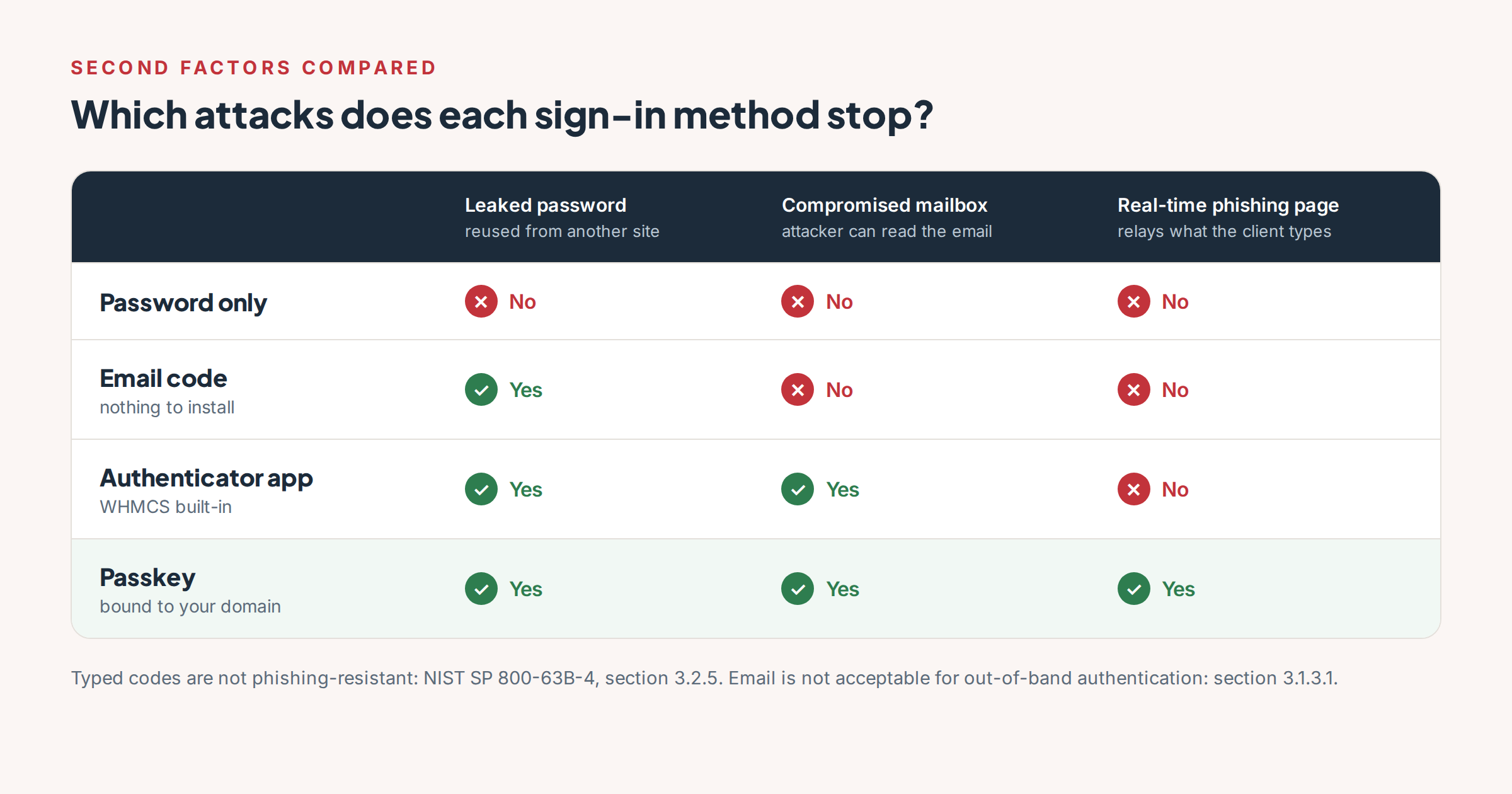
Every second factor beats a password on its own. Only a passkey is bound to your domain, which is what defeats a phishing page that relays codes in real time.
Passkeys are also quicker, and that affects whether people keep them: a sign-in step people resent is a step they ask you to turn off. Across the large services in the FIDO Alliance's Passkey Index, published in October 2025, passkey sign-ins succeeded 93% of the time against 63% for other methods, and took 8.5 seconds on average against 31.2 seconds for traditional multifactor sign-in.
So the ranking is: a passkey is the strong factor, an authenticator app is a good one, and an email code is a floor. A floor is still worth having, because a client with an email code is protected from the most common attack, and a client with only a password is not.
What you can do this week with WHMCS alone
None of the following needs an addon.
- Require two-factor authentication for every admin. Your staff can be asked to install an authenticator app, and an admin account is worth more than any client account. In WHMCS this is the global setting under Configuration, System Settings, Two-Factor Authentication.
- Update WHMCS. Two-factor authentication protects sign-ins, not the software behind them. CVE-2026-67399, published on September 3, 2026, let an unauthenticated user run code on the WHMCS server. No login factor helps against that. It is fixed in 9.0.8 and 8.13.7.
- Check how support verifies identity. WHMCS's own 2012 breach did not start with a stolen password: the attacker impersonated the company to its hosting provider and answered the verification questions. If an email change or a password reset can be arranged through a ticket, that is a way around every factor in this article.
- Encourage clients with domains to turn on two-factor authentication. It stays optional, but a line in your welcome email and on the domain management page costs nothing.
Where AccountGuard fits
What WHMCS does not do is put a second factor in front of every client without asking them to enroll, or move clients toward passkeys. That is the gap we built AccountGuard for. We run our own business on WHMCS, and we wanted protection that reaches the clients who will never open Security Settings. It is our second WHMCS addon, after Firewall Unblocker.
A second step for every account
After the password, AccountGuard sends a code by email to every client user and admin who has no other two-factor method. The code is checked as soon as it is pasted or typed, and iPhones and Macs can offer it straight from the Mail app. Clients who already use an authenticator app, Duo or a YubiKey keep it; AccountGuard does not touch those.
Moving clients to passkeys
Right after a client signs in with an email code, AccountGuard offers to add a passkey to that device in one tap. From then on, in browsers that support it, the passkey is offered in the login page's email field. If you choose, a passkey can replace the password entirely. Once people have passkeys, you can turn off email codes as a backup, and the weakest factor is gone.
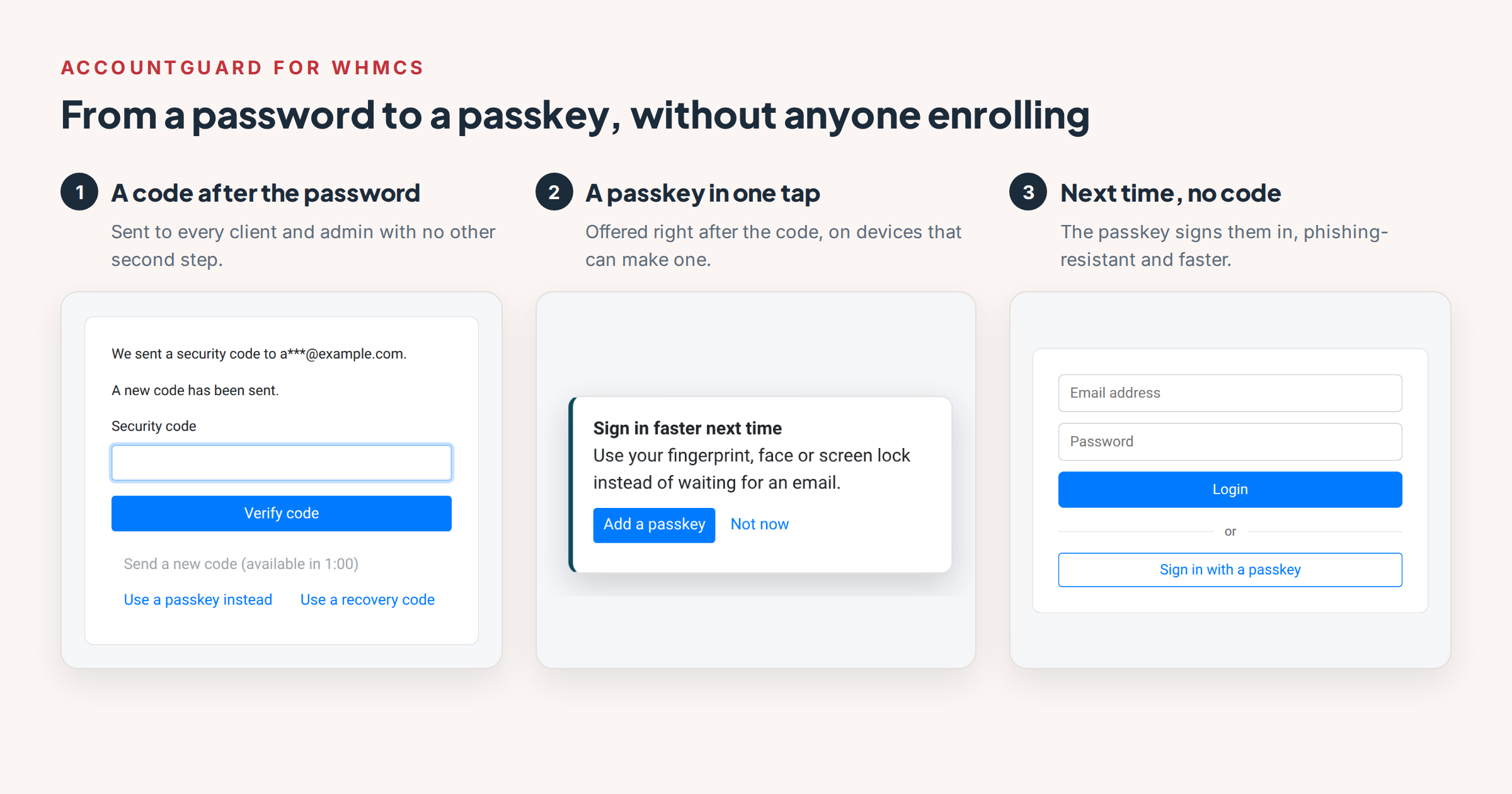
The path from a password to a passkey, as a client sees it. The screens are from a test install; on a live WHMCS they sit inside your client-area theme.
Alerts the owner can act on
Every sign-in from a new browser or network emails the account owner. The email has a "This wasn't me" button that sets a new random password, so the one that was used stops working, and removes sign-in methods, passkeys and recovery codes added since that sign-in. When the password is right but the code fails, the owner gets a separate warning: someone knows your password.
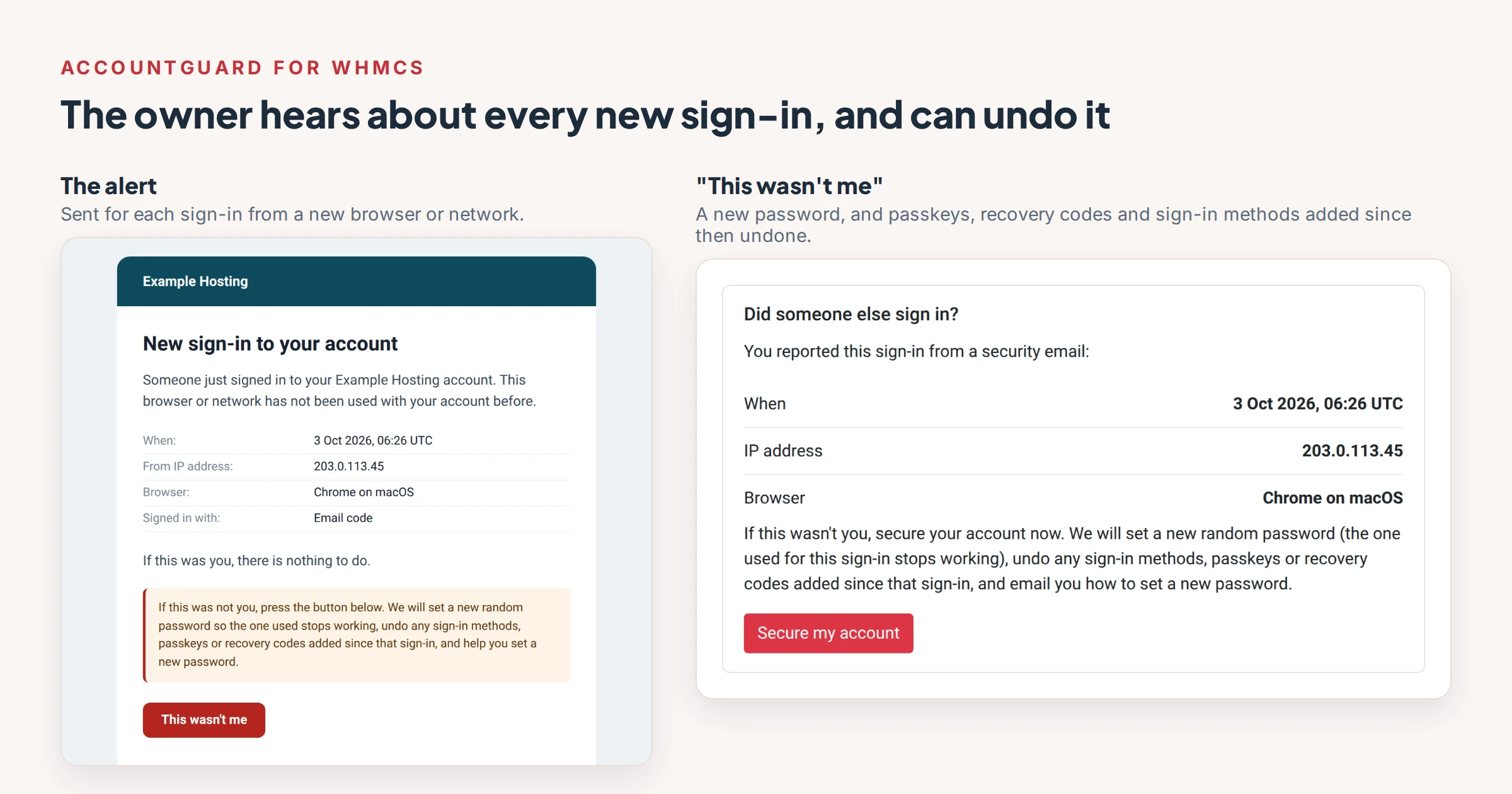
The alert and the page its button opens. Security emails are WHMCS email templates, so on your install they carry your own email design and company name. The details shown are fictional.
Installing and removing it
Nothing switches on until you have entered the code from a test email, so a broken mail setup cannot lock anyone out. Removing AccountGuard puts everyone back on password sign-in in one step. Your team gets its own alerts, a sign-in history and an audit log.
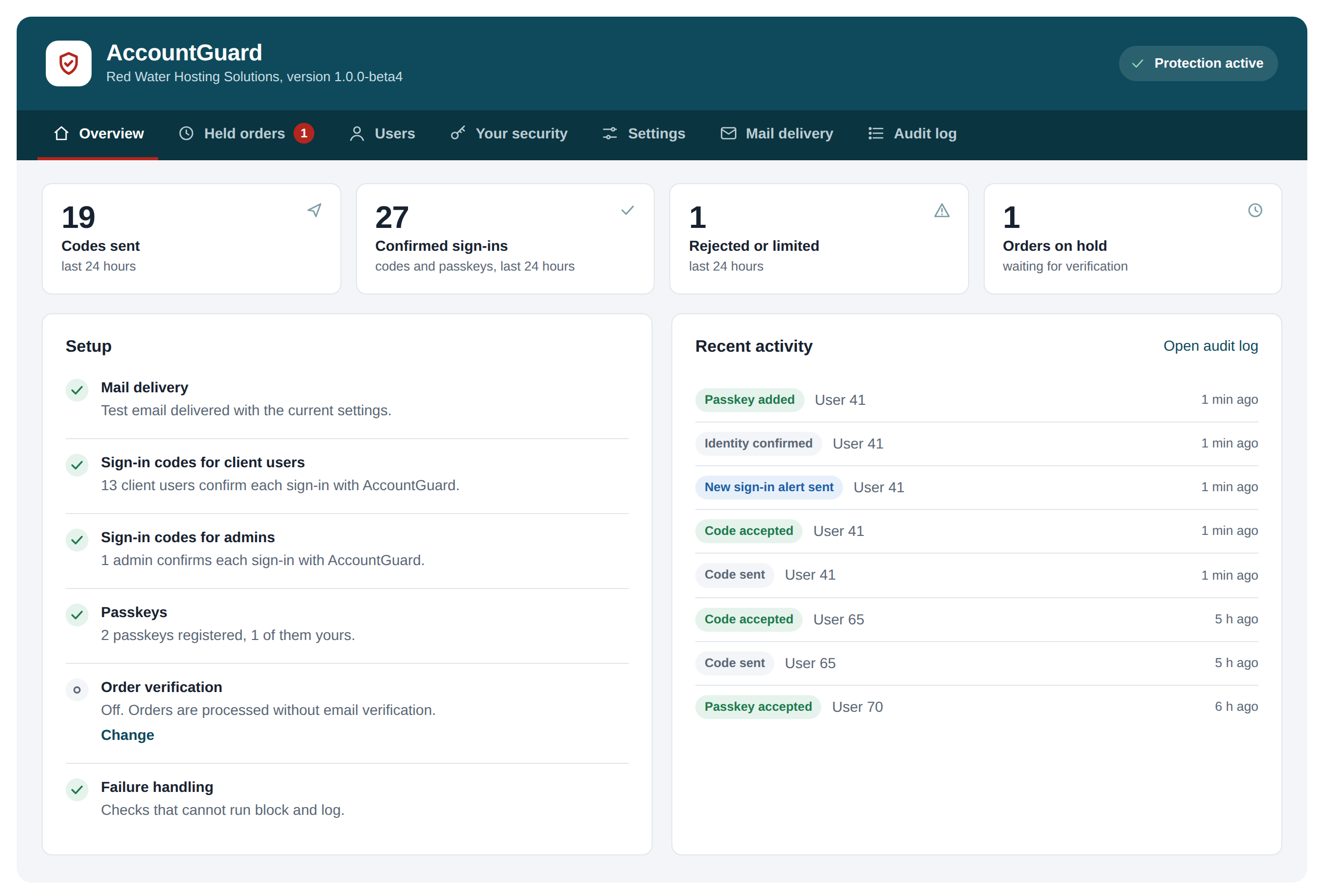
The admin overview on a test install with demonstration data. The setup list only turns green once each step has been proved, starting with a test email you confirm by entering its code.
What it does not do yet
There are no SMS codes, no IP allowlists or country restrictions for the admin area, and no "remember this device" option. Those are on the roadmap, not in the product.
AccountGuard is in public beta: version 1.0.0-beta5, running on live WHMCS installations, with version 1.0 to follow once the beta feedback is in. It requires WHMCS 8.6 or later on PHP 8.1, or WHMCS 9, plus HTTPS and ionCube Loader 13 or newer. It costs $49 a year per WHMCS installation. The AccountGuard page collects the screens, requirements and common questions in one place.
If you run WHMCS, order AccountGuard and try it on a staging copy first. If something does not behave the way this article describes, or a client gets confused by a screen, tell us. Feature ideas go on our feedback board, where other hosts can vote on them. Installation, settings and troubleshooting are covered in the AccountGuard documentation.