11 min read
When did someone last check the software your website runs on? Not the words or the design, and not whether the contact form still sends. The software underneath: the content management system, its plugins, and the version of PHP the server runs them with.
Plenty of business websites were built years ago, handed over and left alone. They still load, customers still find them, and nothing looks wrong, which is exactly why old software goes unnoticed. A site can work perfectly well for its visitors while running code with flaws that have been public for months.
Two things this year made that harder to ignore. In July, Australia's national cybersecurity agency warned of a large-scale campaign breaking into websites through known flaws in CMS software and plugins, every one of which already had a patch. Government agencies and Google have also been documenting attackers using AI to find and weaponize flaws faster. What follows covers what has actually been reported, what it means for a site on older WordPress, Joomla or PHP, and what to check first.
Nobody has to choose your site
It is natural to picture an attack as personal: someone picks your company, studies it and works at getting in. That does happen, but most website break-ins work the other way around. Automated tools scan the internet for sites running a particular plugin or version with a known flaw, then attack whatever they find.
The scanner does not know what your business sells or how big it is. It only knows whether your site answers in a way that suggests the vulnerable code is there. A small site gets found the same way a large one does, by being online.
What the July 2026 campaign went after
On July 9, 2026, the Australian Signals Directorate's Australian Cyber Security Centre (ACSC) published an alert about "a large-scale exploitation campaign" targeting content management systems "globally, including in Australia, with many small to medium sized Australian businesses impacted."
The attackers were scanning websites for a chance to install webshells. A webshell is a small script uploaded to a web server that lets an attacker run commands on it through ordinary web requests, and it keeps working after the original flaw is fixed. According to the alert, the flaws mostly allowed unauthenticated file uploads, meaning no login was needed, or remote code execution.
The alert names 17 products. Eleven are marked as WordPress plugins, among them Ninja Forms, Gravity Forms, WPvivid Backup and Breeze Cache. One is JCE, an editor extension for Joomla. Three are other CMS platforms: Craft CMS, MaxSite CMS and MetInfo. Two more, pay-uz and Sneeit Framework, are listed without a platform. None of the 17 is a flaw in WordPress or Joomla itself.
The most important sentence for site owners is in the alert's advice: "The vulnerabilities exploited in this campaign are public and known vulnerabilities, with patches available." The campaign did not need anything new. It needed sites where an available fix had not been installed.
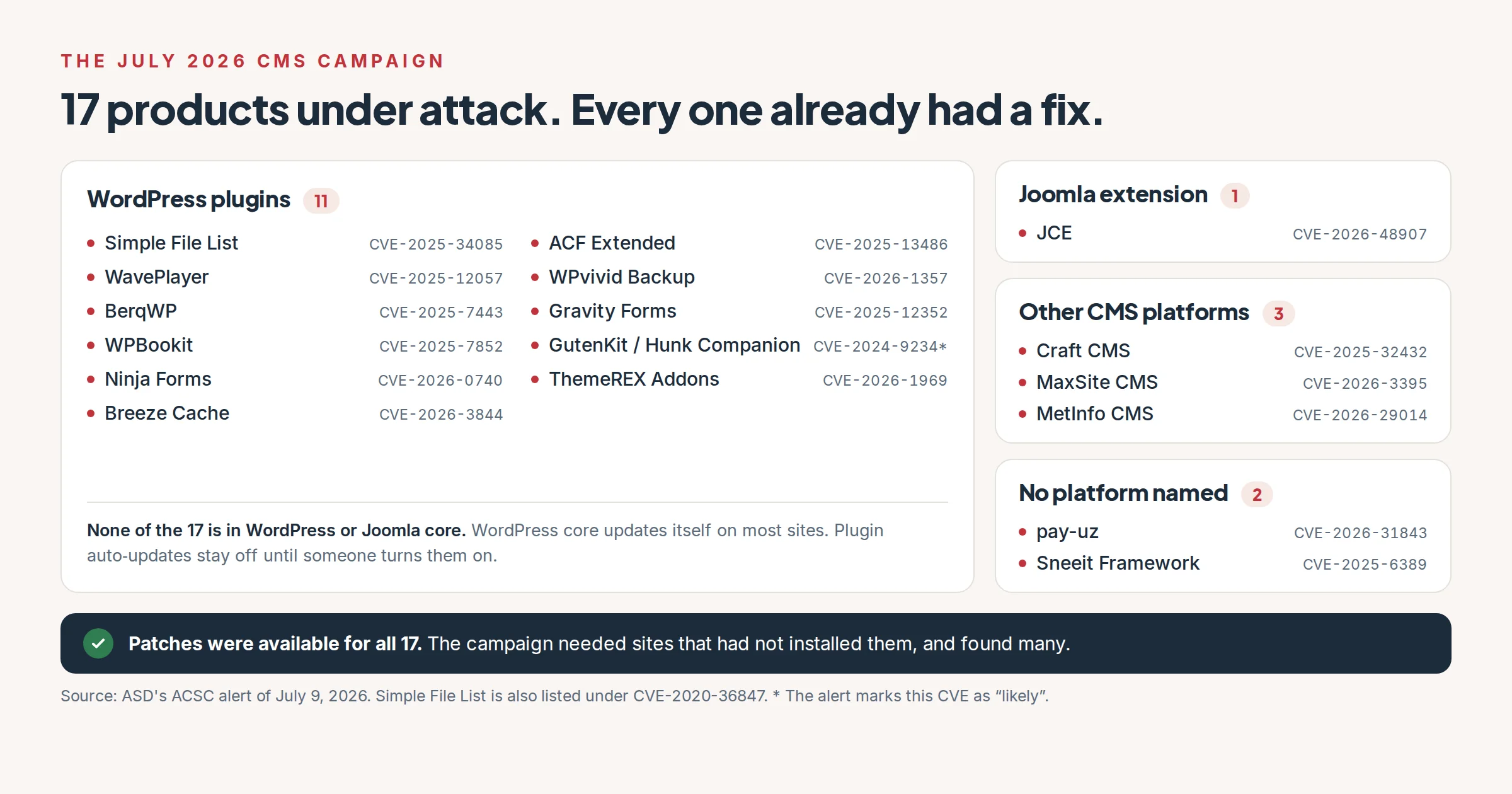
Every product in the alert had a fix available. A site with that fix installed was not exposed to the flaw. Source: ASD's ACSC alert of July 9, 2026.
What does AI have to do with it?
AI is not a button that breaks into websites. What the published evidence shows is attackers using it to do familiar work faster.
On June 22, 2026, the cybersecurity agencies of the Five Eyes countries (Australia, Canada, New Zealand, the United Kingdom and the United States) released a joint statement on AI. The Australian summary puts its central point plainly: "AI is compressing the time between the discovery of vulnerabilities and their exploitation, meaning cyber risk assumptions can become outdated in months, not years." The July alert placed the CMS campaign in exactly that context.
In May 2026, Google Threat Intelligence Group published a report on how attackers use AI. Google said it had, for the first time, found an exploit it believes was developed with AI for a zero-day, a flaw nobody had fixed yet, in the hands of a criminal group. The exploit got past two-factor authentication on "a popular open-source, web-based system administration tool", although it still needed a valid username and password. The group planned to use it for mass exploitation, and Google says its own discovery may have prevented that. The same report describes a state-sponsored group sending thousands of prompts to analyze known vulnerabilities and check whether proof-of-concept exploits work. That is the part that matters for an outdated website: turning a published flaw into a working attack is getting quicker.
The limits matter too. Neither the ACSC nor Google says the July campaign itself was run with AI, and unpatched websites were being broken into long before anyone used a language model. What has changed is the margin. A published security fix also points attackers at the flaw it fixes, and the time between that fix and the first attacks is the time a site owner has to install it.
Why plugins are where WordPress sites get caught
WordPress core has been able to update itself in the background since version 3.7, and the WordPress documentation says these automatic updates "are enabled on most sites" by default. Plugins work differently. Since WordPress 5.5, administrators can turn on automatic updates for plugins, but they stay off until someone opts in for each plugin. That is how a site with current WordPress core ends up running a plugin months out of date, and it fits the ACSC list, which is mostly plugins.
The core version still matters. The WordPress support policy says "the only current officially supported version is the last major release", and that security fixes are backported to older branches only "as a courtesy", with "no guarantee and no timeframe". The latest major release is 7.1. On November 12, 2026, WordPress.org's own statistics put 66% of sites on it, which leaves about a third on older major versions.
Plugins that nobody maintains are a separate problem. A plugin that has not been updated in years will not get a fix when a flaw is found, however quickly you install everything else. Each plugin's page in the WordPress.org directory shows when it was last updated and which WordPress version it was tested up to, which makes an abandoned one easy to spot.
Old Joomla, old PHP: which versions still get security fixes?
Joomla publishes its support dates. Official support for Joomla 3 ended on August 17, 2023, when the project told remaining Joomla 3 sites to migrate, and a paid extended support service exists for sites that cannot move yet. The same announcement acknowledged why some sites stay: an essential extension was never ported, or the site is too heavily customized to move easily. Joomla's roadmap now lists only Joomla 5 and Joomla 6 as supported, so a site still on Joomla 3 or 4 is outside the project's regular support.
PHP matters as much as the CMS, and site owners see it least, because the server decides which version runs. PHP 8.2 is the one to watch: its security support ends on December 31, 2026. In WordPress.org's statistics, 32.1% of WordPress sites run PHP 8.1 or older, versions the PHP project no longer patches, and another 22.5% run PHP 8.2. Unless those sites are upgraded, more than half of the WordPress sites in those statistics will be on a PHP version without security support from the PHP project in January.
Those dates cover the PHP project's own releases. If your PHP came from a Linux distribution or a hosting platform, ask whether that vendor still patches the version you run.
Here is where things stand on November 12, 2026:
| Software | Security fixes |
|---|---|
| WordPress 7.1, the latest major release | Supported |
| Older WordPress major releases | As a courtesy, with no guarantee or timeframe |
| Joomla 3 | Ended August 17, 2023 |
| Joomla 4 | Not listed as supported on Joomla's roadmap |
| Joomla 5 | Until October 12, 2027 (bug fixes ended October 13, 2026) |
| Joomla 6 | Until October 16, 2029 |
| PHP 8.1 and older | Ended (8.1 on December 31, 2025) |
| PHP 8.2 | Until December 31, 2026 |
| PHP 8.3 | Until December 31, 2027 |
| PHP 8.4 | Until December 31, 2028 |
| PHP 8.5 | Until December 31, 2029 |
What happens when a site is compromised?
A compromised website does not always go down. Often it keeps working, because that suits the attacker. The ACSC lists what attackers in the July campaign could do with a webshell: deface or disrupt the site, capture "credentials entered by website users or other data stored on web servers", upload malware "to target and scam legitimate website users", and use the server as a way into a wider network.
The first sign may be a customer asking about a strange redirect, a browser warning on your own domain, or a message from your host. Cleaning up rarely means deleting one file. The ACSC's advice is to treat a server with a webshell as compromised, trace the requests that planted it, remove anything that gives the attacker a way back in, patch the flaw, and restore from "a recent known-good backup".
The words known-good matter. A backup taken after the break-in includes the webshell, so how far back your backups go decides whether a clean copy exists at all.
Five things to check this week
None of these needs a security specialist.
- Find out which versions you run. You need the CMS version and the PHP version. In WordPress, both are under Tools, Site Health, Info. In Joomla, they are under System, System Information. Compare them with the table above.
- Go through your plugins or extensions. For each one, ask whether it is still maintained and whether you still use it. Delete what you do not need, because a deactivated plugin's files are still on the server. Where a bad update can be rolled back easily, the ACSC suggests applying security patches automatically, which in WordPress means turning on auto-updates for those plugins.
- Check who can log in. Remove accounts for people who no longer work on the site, and turn on two-factor authentication for administrators.
- Check your backups. Find out where they are stored, how many days back they go, and whether anyone has restored one recently. Backups kept on the same server as the site are within reach of whoever gets into that server.
- Decide who owns updates. It could be your developer, your host or you. If the answer is nobody, fix that first. If someone else maintains the site, the ACSC suggests pointing them to its alert.
What hosting can do, and what it cannot
Good hosting takes some of this off your hands. On our WordPress hosting, WordPress core and plugin updates are on by default, and cPGuard scans for malware and runs a web application firewall (WAF). Every plan includes staging, so a risky update can be tried on a copy first, and daily backups are kept off the server for 30 days. Support tickets go to engineers. The plans run any PHP application, Joomla included, but the managed updates we offer are for WordPress core and plugins.
What we will not tell you is that moving to our servers makes an outdated or compromised site safe. It does not. A vulnerable plugin is still vulnerable after a migration, and a webshell copied across with the site's files works just as well on the new server. The fix might be an update, a replacement for a plugin nobody maintains, or, for a Joomla 3 site or anything else past its end of life, a rebuild. We would rather tell you which of those applies than sell you a hosting plan as the answer.
If moving is part of the answer, our free migration is done by an engineer, and switching WordPress hosts without downtime walks through the steps whoever does the work.
Not sure what your site runs on?
Tell us what you know, even if it is only the address and who built it. We will talk through whether it needs an update, a replacement, a move or a rebuild, and we will not push an upgrade you do not need. Get in touch with the team.
A website that worked yesterday says little about whether it is patched today. That is not a reason to panic, but it is a reason for someone to look.